> ## Documentation Index
> Fetch the complete documentation index at: https://docs.zeroruntime.ai/llms.txt
> Use this file to discover all available pages before exploring further.
# Deploy an Agent
> Make a committed version live, size its capacity, and split traffic across branches.
Deploying runs your agent so it can take real calls.
**Commit first.** A deployment always uses a committed version, so uncommitted draft changes are never deployed. See [Drafts and commits](/agent-builder/versioning/drafts-and-commits).
The **Deploy** button is enabled only after you commit your changes. While the branch has uncommitted changes, it stays disabled.
Select **Deploy** in the builder header to open the deployment settings. The button is disabled when:
* The branch has uncommitted changes: *"Please commit changes before deploy."*
* The latest commit is already deployed.
To change the settings of a deployment that's already live, without committing anything new, open the branch's **⋮** menu on the **Branches** tab and select **Edit Deployment**.
## Basic settings
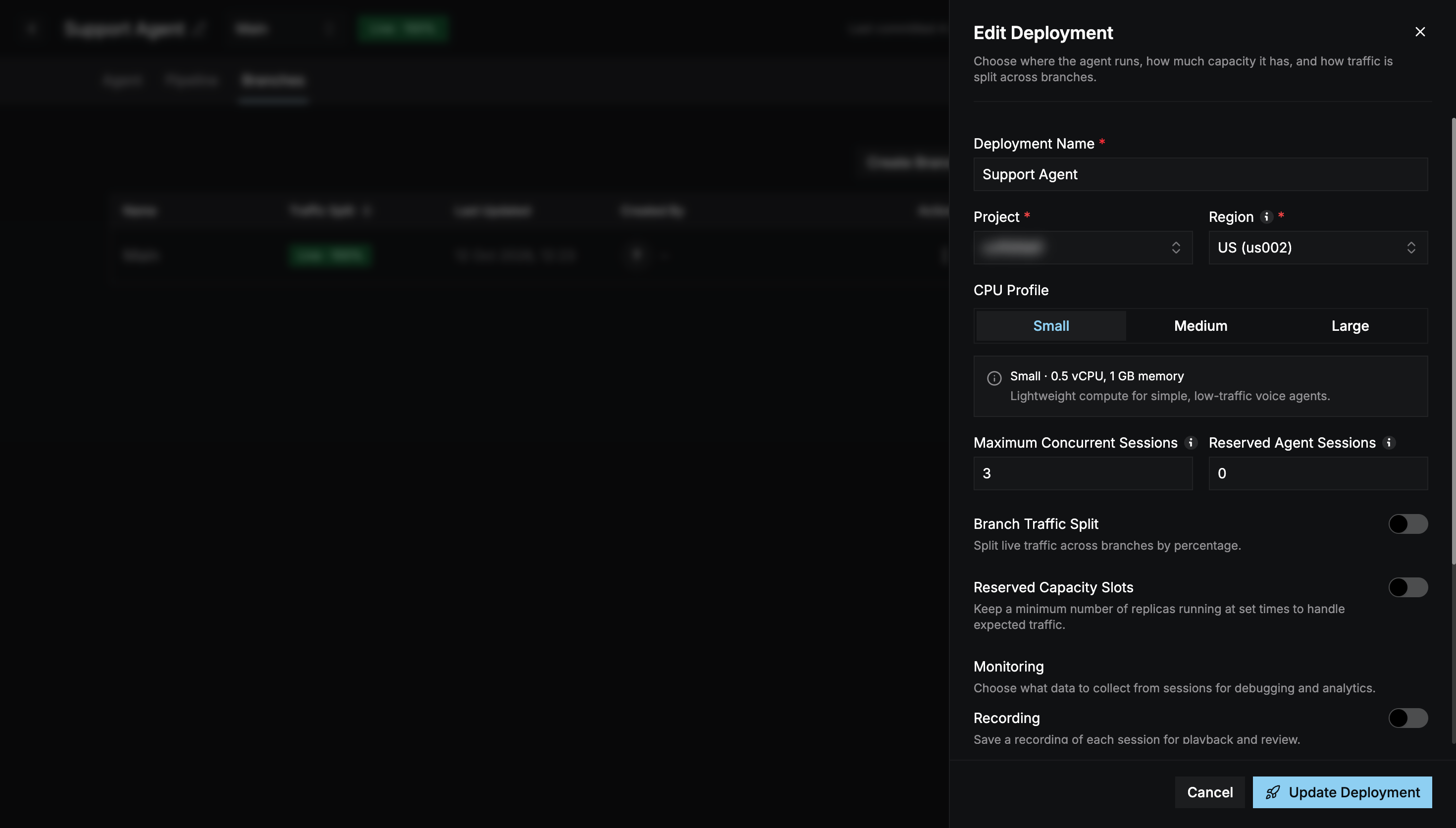 The panel is titled **Deploy Agent** on the first deploy, and **Edit Deployment** after that.
| Setting | Description |
| - | - |
| **Deployment Name** (required) | Defaults to *Agent Deployment*. |
| **Project** (required) | The API key the deployment runs under. |
| **Region** (required) | **US** or **India**. Pick the region closest to your model providers for lower latency. |
| **CPU Profile** | **Small** (0.5 vCPU, 1 GB), **Medium** (1 vCPU, 2 GB), or **Large** (1.5 vCPU, 3 GB). |
| **Maximum Concurrent Sessions** | The most calls the agent handles at once. Limited by your plan. |
| **Reserved Agent Sessions** | Sessions kept warm so new calls start without delay. |
## Branch traffic split
Turn on **Branch Traffic Split** to send live calls to more than one branch by percentage, for example 90% Main and 10% a test branch.
* Add branches with **Add Branch**. Main can't be removed.
* The percentages must add up to **100%**.
* With the split off, Main receives all traffic.
When traffic is split, only languages configured in **every** branch with traffic are deployed. If the branches share no languages, you can't deploy.
## Reserved capacity slots
Turn on **Reserved Capacity Slots** to keep a minimum number of agent instances running at set times, for example during business hours.
* Choose a **Timezone**.
* Add **Slots**, each with a name, day, start time, end time, and **Minimum Replicas**.
* Add **Overrides** to replace the schedule on specific dates or date ranges, such as holidays or launch days. Leave the times blank to cover the whole day.
## Monitoring
Choose what to collect from each session: **Recording**, **Transcripts**, **Traces**, and **Logs**, plus optional **Redaction** of sensitive data. See [Observability](/agent-builder/observability) for what each option collects and where to view it.
## Deploy
Select **Deploy Agent**, or **Update Deployment** for an existing deployment. The deployment then appears on the **Deployments** page.
## Test your agent
The **Preview** panel on the right of the builder lets you call your agent from the browser, without a phone.
The agent must be deployed at least once before you can test it, even when testing the current draft.
Under **Test Version**, choose:
* **Current Draft**: includes your uncommitted changes.
* **Last Deployed**: the version that's live on this branch.
Select **Start Test Call** and allow microphone access.
Speak to the agent. Select **End Call** when you're done.
The test call uses the language currently selected in the builder, and each [variable's](/agent-builder/agent/variables) **Preview Value**.
Select **Expand Preview** (or press **F**) for the full-screen view, and **Esc** to collapse it. During the call you can see:
* The live transcript, including tool calls and the knowledge chunks retrieved for each turn.
* The configuration being tested: models, language, voice, turn detection, VAD, and system prompt.
* Per-turn latency for speech-to-text, end of turn, LLM, time to first byte, and text-to-speech.
To test over the phone, connect a number with a [routing rule](/agent-builder/telephony/integration).
This documentation is built and hosted on [Mintlify](https://mintlify.com), a developer documentation platform.
The panel is titled **Deploy Agent** on the first deploy, and **Edit Deployment** after that.
| Setting | Description |
| - | - |
| **Deployment Name** (required) | Defaults to *Agent Deployment*. |
| **Project** (required) | The API key the deployment runs under. |
| **Region** (required) | **US** or **India**. Pick the region closest to your model providers for lower latency. |
| **CPU Profile** | **Small** (0.5 vCPU, 1 GB), **Medium** (1 vCPU, 2 GB), or **Large** (1.5 vCPU, 3 GB). |
| **Maximum Concurrent Sessions** | The most calls the agent handles at once. Limited by your plan. |
| **Reserved Agent Sessions** | Sessions kept warm so new calls start without delay. |
## Branch traffic split
Turn on **Branch Traffic Split** to send live calls to more than one branch by percentage, for example 90% Main and 10% a test branch.
* Add branches with **Add Branch**. Main can't be removed.
* The percentages must add up to **100%**.
* With the split off, Main receives all traffic.
When traffic is split, only languages configured in **every** branch with traffic are deployed. If the branches share no languages, you can't deploy.
## Reserved capacity slots
Turn on **Reserved Capacity Slots** to keep a minimum number of agent instances running at set times, for example during business hours.
* Choose a **Timezone**.
* Add **Slots**, each with a name, day, start time, end time, and **Minimum Replicas**.
* Add **Overrides** to replace the schedule on specific dates or date ranges, such as holidays or launch days. Leave the times blank to cover the whole day.
## Monitoring
Choose what to collect from each session: **Recording**, **Transcripts**, **Traces**, and **Logs**, plus optional **Redaction** of sensitive data. See [Observability](/agent-builder/observability) for what each option collects and where to view it.
## Deploy
Select **Deploy Agent**, or **Update Deployment** for an existing deployment. The deployment then appears on the **Deployments** page.
## Test your agent
The **Preview** panel on the right of the builder lets you call your agent from the browser, without a phone.
The agent must be deployed at least once before you can test it, even when testing the current draft.
Under **Test Version**, choose:
* **Current Draft**: includes your uncommitted changes.
* **Last Deployed**: the version that's live on this branch.
Select **Start Test Call** and allow microphone access.
Speak to the agent. Select **End Call** when you're done.
The test call uses the language currently selected in the builder, and each [variable's](/agent-builder/agent/variables) **Preview Value**.
Select **Expand Preview** (or press **F**) for the full-screen view, and **Esc** to collapse it. During the call you can see:
* The live transcript, including tool calls and the knowledge chunks retrieved for each turn.
* The configuration being tested: models, language, voice, turn detection, VAD, and system prompt.
* Per-turn latency for speech-to-text, end of turn, LLM, time to first byte, and text-to-speech.
To test over the phone, connect a number with a [routing rule](/agent-builder/telephony/integration).
This documentation is built and hosted on [Mintlify](https://mintlify.com), a developer documentation platform.