> ## Documentation Index
> Fetch the complete documentation index at: https://docs.zeroruntime.ai/llms.txt
> Use this file to discover all available pages before exploring further.
# Knowledge Base
> Ground your agent's answers in your own documents, text, and websites.
A knowledge base lets the agent answer questions from your own content, such as FAQs, product docs, policies, or your website. You add content once in the **Knowledge Base** module, then assign it to any agent.
## Add content
In the dashboard sidebar, open **Knowledge Base** and select **Add source**.
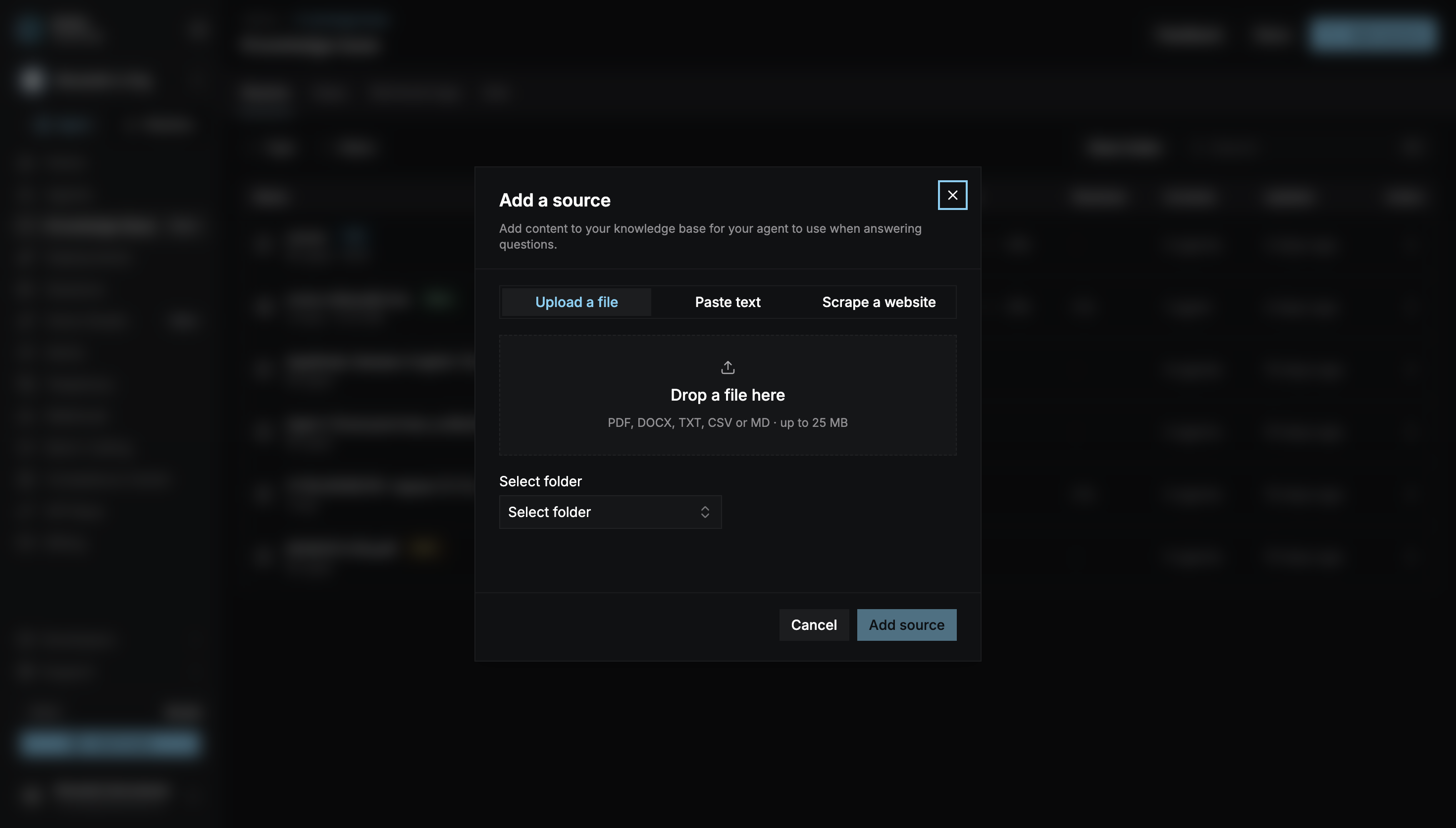 | Source | What to add |
| - | - |
| **Upload a file** | PDF, DOCX, TXT, CSV, or MD files, up to 25 MB each and 10 at a time. |
| **Paste text** | A **Source name** and the text the agent should know. |
| **Scrape a website** | A website URL. Choose a **Level of scraping** (how many link levels to follow, 1–5), select **Find pages**, then choose the pages to keep. Set **Rescrape** to Daily, Weekly, or Monthly to keep the content up to date. |
Use **Select folder** to put the source in a folder, or create one with **Add new folder**. Folders make it easy to assign related content together.
Select **Add source**. The source is processed, and its status changes to **Ready** when the agent can use it.
Short, focused documents work best. Split long manuals into topics, and keep each source about one subject.
## Assign it to your agent
In the agent builder, open the **Pipeline** tab and select **Knowledge Base**.
Hover over a folder or source and select **Assign**. Assigning a folder attaches everything inside it. Search, filter by **Type** (Folders, Website, Files, or Text), or show only **Unassigned** sources to find what you need.
| Source | What to add |
| - | - |
| **Upload a file** | PDF, DOCX, TXT, CSV, or MD files, up to 25 MB each and 10 at a time. |
| **Paste text** | A **Source name** and the text the agent should know. |
| **Scrape a website** | A website URL. Choose a **Level of scraping** (how many link levels to follow, 1–5), select **Find pages**, then choose the pages to keep. Set **Rescrape** to Daily, Weekly, or Monthly to keep the content up to date. |
Use **Select folder** to put the source in a folder, or create one with **Add new folder**. Folders make it easy to assign related content together.
Select **Add source**. The source is processed, and its status changes to **Ready** when the agent can use it.
Short, focused documents work best. Split long manuals into topics, and keep each source about one subject.
## Assign it to your agent
In the agent builder, open the **Pipeline** tab and select **Knowledge Base**.
Hover over a folder or source and select **Assign**. Assigning a folder attaches everything inside it. Search, filter by **Type** (Folders, Website, Files, or Text), or show only **Unassigned** sources to find what you need.
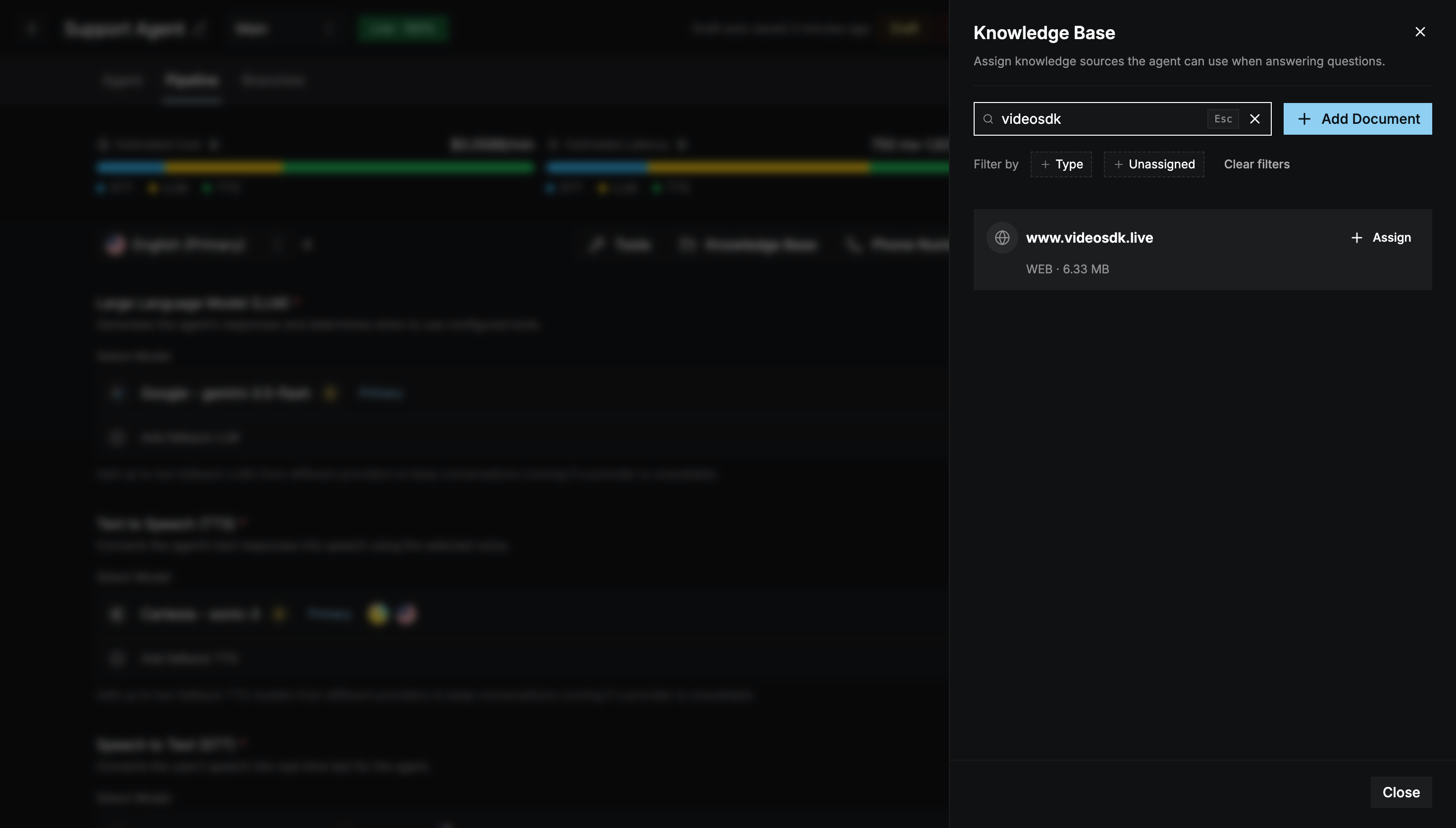 Assignments are saved to the draft. [Commit](/agent-builder/versioning/drafts-and-commits) and [deploy](/agent-builder/deploy) to use them in live calls.
To remove a source from the agent, select **Unassign**.
## Check that it works
Run a [test call](/agent-builder/deploy#test-your-agent) and ask a question your content answers. The transcript shows which knowledge chunks the agent retrieved for each turn.
The Knowledge Base module also helps you improve your content over time:
* **Gaps**: questions the agent couldn't answer from your content.
* **Retrieval logs**: which content was retrieved for each question.
* **Ask**: try a question against your knowledge base directly.
This documentation is built and hosted on [Mintlify](https://mintlify.com), a developer documentation platform.
Assignments are saved to the draft. [Commit](/agent-builder/versioning/drafts-and-commits) and [deploy](/agent-builder/deploy) to use them in live calls.
To remove a source from the agent, select **Unassign**.
## Check that it works
Run a [test call](/agent-builder/deploy#test-your-agent) and ask a question your content answers. The transcript shows which knowledge chunks the agent retrieved for each turn.
The Knowledge Base module also helps you improve your content over time:
* **Gaps**: questions the agent couldn't answer from your content.
* **Retrieval logs**: which content was retrieved for each question.
* **Ask**: try a question against your knowledge base directly.
This documentation is built and hosted on [Mintlify](https://mintlify.com), a developer documentation platform.