> ## Documentation Index
> Fetch the complete documentation index at: https://docs.zeroruntime.ai/llms.txt
> Use this file to discover all available pages before exploring further.
# Models
> Pick the LLM, text-to-speech, and speech-to-text models, voices, and fallbacks for your agent.
The Pipeline tab has three model sections. Each needs at least one model:
| Section | Role |
| - | - |
| **Large Language Model (LLM)** | Generates the agent's responses and decides when to use tools. |
| **Text to Speech (TTS)** | Turns the agent's text into speech using the selected voice. |
| **Speech to Text (STT)** | Transcribes the caller's speech in real time. |
## Choose a model
Select a model row to open the model picker.
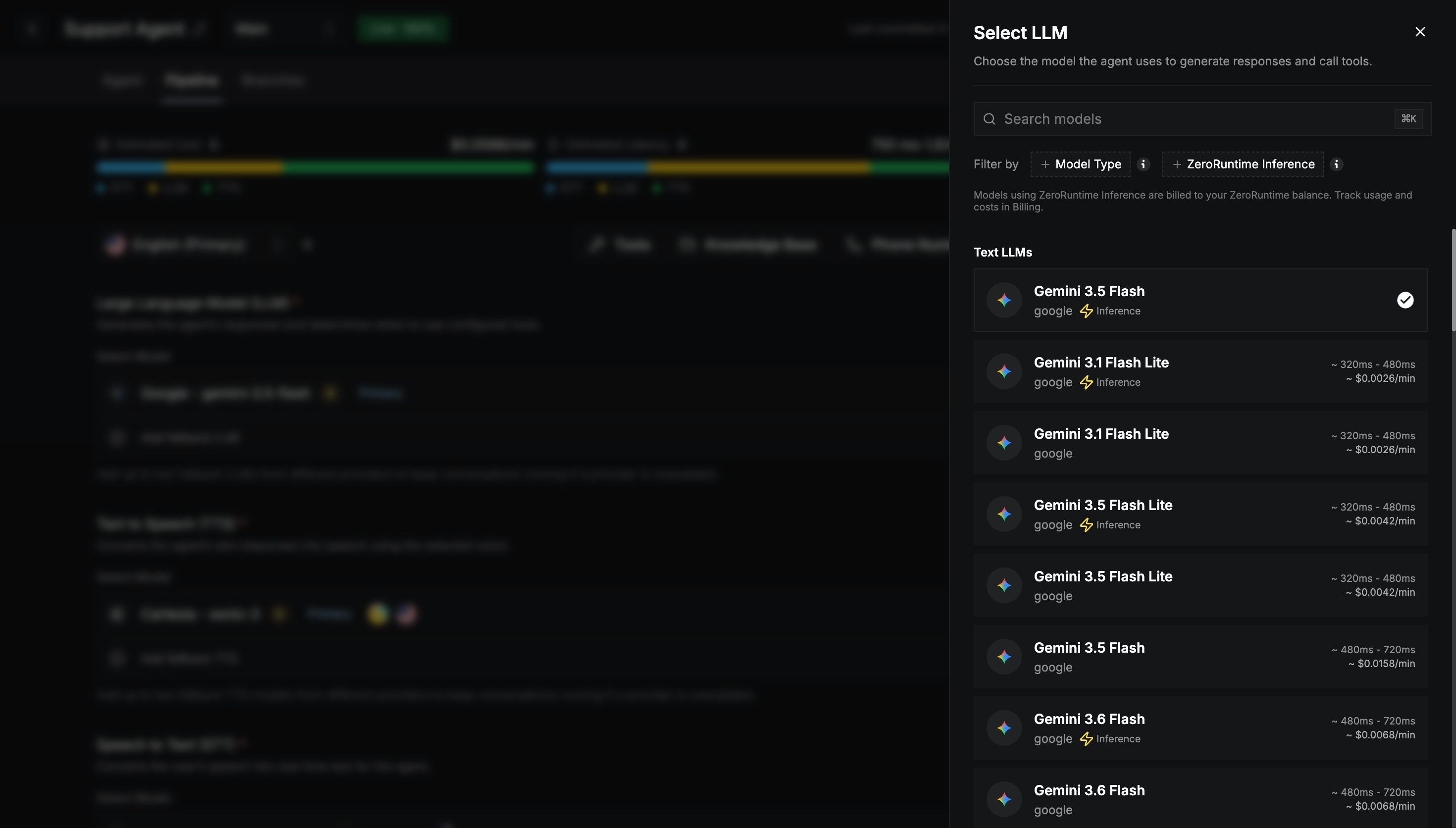 You can search, and filter by:
* **Model Type**:
* **Audio LLMs** listen and speak directly, without separate STT and TTS. Choosing one makes the pipeline [realtime](/agent-builder/pipeline/overview#pipeline-types).
* **Text LLMs** work with the STT and TTS models you select.
* **ZeroRuntime Inference**: shows only models hosted by Zero Runtime.
Each model card shows its approximate latency and cost per minute.
After you pick a model, the builder walks you through any remaining steps:
Shown only if the model supports extra settings. See [Advanced settings](#advanced-settings) below.
Choose the language the model should understand or speak.
For TTS and realtime models, browse voices with filters (gender, age, accent, and category) and play previews.
For models without the **Inference** badge, choose or add a secret holding your provider API key. See [Use your own API keys](#use-your-own-api-keys).
Models with the ⚡ **Inference** badge are hosted by Zero Runtime. They need no provider API key, and their usage is billed to your Zero Runtime balance.
To change a model later, open the row's **⋮** menu. From there you can change the model, languages, voice, or advanced settings, or remove a fallback.
## Fallback models
Add up to **two fallback models** for each section with **Add fallback LLM**, **Add fallback TTS**, or **Add fallback STT**. If the **Primary** model's provider is unavailable, the agent tries the fallbacks in order, so the conversation keeps going.
* Choose fallbacks from **different providers** than the primary.
* With two fallbacks, drag them to change the order.
* A realtime (audio) primary LLM can't have fallbacks.
## Advanced settings
Settings, ranges, and defaults depend on the model. Common ones are:
| Model | Settings |
| - | - |
| **LLM** | Max Tokens, Reasoning Effort, Temperature, Creativity (top-p), Response Variety (top-k), Reduce Repetition, Encourage New Ideas, Tool Usage |
| **STT** | Automatic Punctuation, Profanity Filter, Custom Vocabulary, End-of-Speech Sensitivity |
| **TTS** | Speaking Speed, Voice Style, Pronunciation (word → pronunciation pairs) |
Add product names and other jargon to **Custom Vocabulary** so the STT model recognizes them. Use **Pronunciation** so the TTS model says them correctly.
## Use your own API keys
Models with the ⚡ **Inference** badge need no key. To use a model from your own provider account, such as OpenAI, Anthropic, Google, Deepgram, Cartesia, or ElevenLabs, store its API key as a **secret**.
Select **Secrets** in the builder header. Search for a provider, or filter by **Type** (Audio LLM, Text LLM, STT, or TTS).
Select **Manage Keys** next to the provider, then **Add Secret**. Enter a **Secret Name** (for example *Production key*), the **API Key**, and optional tags. Then select **Save Secret**.
When you pick a non-inference model, the builder asks you to choose one of the provider's secrets.
Keys are encrypted and never shown again. To change a key, edit the secret and enter the key again. Secrets in use show an **Assigned** badge.
Deleting a secret stops every agent using it from working until you select another key.
This documentation is built and hosted on [Mintlify](https://mintlify.com), a developer documentation platform.
You can search, and filter by:
* **Model Type**:
* **Audio LLMs** listen and speak directly, without separate STT and TTS. Choosing one makes the pipeline [realtime](/agent-builder/pipeline/overview#pipeline-types).
* **Text LLMs** work with the STT and TTS models you select.
* **ZeroRuntime Inference**: shows only models hosted by Zero Runtime.
Each model card shows its approximate latency and cost per minute.
After you pick a model, the builder walks you through any remaining steps:
Shown only if the model supports extra settings. See [Advanced settings](#advanced-settings) below.
Choose the language the model should understand or speak.
For TTS and realtime models, browse voices with filters (gender, age, accent, and category) and play previews.
For models without the **Inference** badge, choose or add a secret holding your provider API key. See [Use your own API keys](#use-your-own-api-keys).
Models with the ⚡ **Inference** badge are hosted by Zero Runtime. They need no provider API key, and their usage is billed to your Zero Runtime balance.
To change a model later, open the row's **⋮** menu. From there you can change the model, languages, voice, or advanced settings, or remove a fallback.
## Fallback models
Add up to **two fallback models** for each section with **Add fallback LLM**, **Add fallback TTS**, or **Add fallback STT**. If the **Primary** model's provider is unavailable, the agent tries the fallbacks in order, so the conversation keeps going.
* Choose fallbacks from **different providers** than the primary.
* With two fallbacks, drag them to change the order.
* A realtime (audio) primary LLM can't have fallbacks.
## Advanced settings
Settings, ranges, and defaults depend on the model. Common ones are:
| Model | Settings |
| - | - |
| **LLM** | Max Tokens, Reasoning Effort, Temperature, Creativity (top-p), Response Variety (top-k), Reduce Repetition, Encourage New Ideas, Tool Usage |
| **STT** | Automatic Punctuation, Profanity Filter, Custom Vocabulary, End-of-Speech Sensitivity |
| **TTS** | Speaking Speed, Voice Style, Pronunciation (word → pronunciation pairs) |
Add product names and other jargon to **Custom Vocabulary** so the STT model recognizes them. Use **Pronunciation** so the TTS model says them correctly.
## Use your own API keys
Models with the ⚡ **Inference** badge need no key. To use a model from your own provider account, such as OpenAI, Anthropic, Google, Deepgram, Cartesia, or ElevenLabs, store its API key as a **secret**.
Select **Secrets** in the builder header. Search for a provider, or filter by **Type** (Audio LLM, Text LLM, STT, or TTS).
Select **Manage Keys** next to the provider, then **Add Secret**. Enter a **Secret Name** (for example *Production key*), the **API Key**, and optional tags. Then select **Save Secret**.
When you pick a non-inference model, the builder asks you to choose one of the provider's secrets.
Keys are encrypted and never shown again. To change a key, edit the secret and enter the key again. Secrets in use show an **Assigned** badge.
Deleting a secret stops every agent using it from working until you select another key.
This documentation is built and hosted on [Mintlify](https://mintlify.com), a developer documentation platform.