> ## Documentation Index
> Fetch the complete documentation index at: https://docs.zeroruntime.ai/llms.txt
> Use this file to discover all available pages before exploring further.
# Pipeline Overview
> Choose how your agent listens, thinks, and speaks, and see its cost and latency as you build.
The **Pipeline** tab configures the models and real-time audio behavior behind your agent.
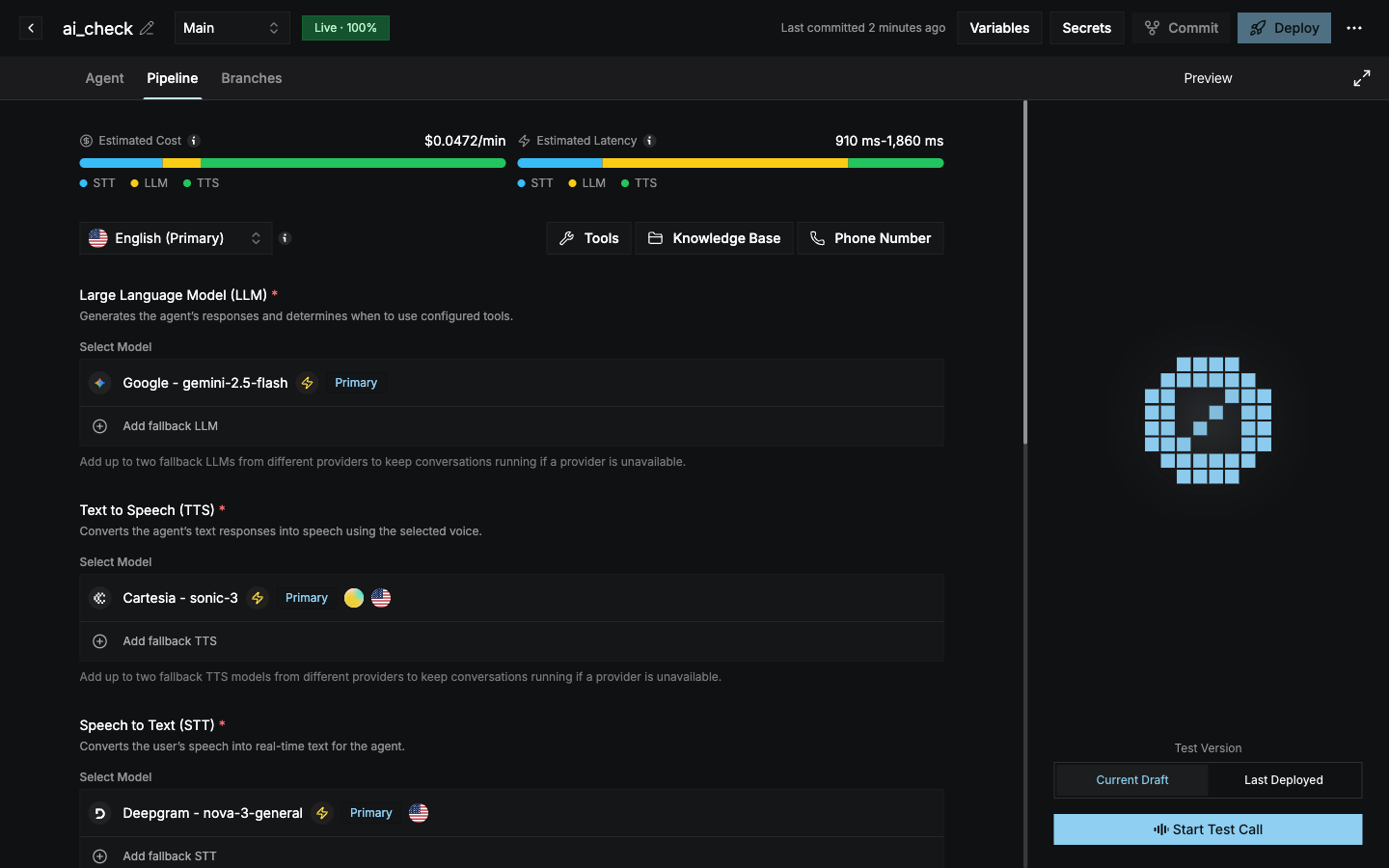 ## Estimated cost and latency
The two bars at the top update as you change models:
* **Estimated Cost**: the total cost per minute across STT, LLM, and TTS.
* **Estimated Latency**: the expected processing time range across STT, LLM, and TTS.
Hover over a segment to see how much each model contributes.
## Pipeline types
**STT → LLM → TTS.** You pick each model separately. This gives you the most control over voices, languages, and turn-taking.
A single audio model listens and speaks directly. The STT, TTS, turn detection, interruption, and VAD sections are hidden. Noise cancellation still applies.
The pipeline type follows the primary LLM you choose. See [Models](/agent-builder/pipeline/models).
## Per-language pipelines
The pipeline is configured **per language**. Use the language selector to switch between them.
* Languages that support default models are preselected.
* For other languages, select the models manually.
[VAD and interruption handling](/agent-builder/pipeline/turn-detection-and-interruptions) apply to every language.
## What's on this tab
LLM, TTS, and STT models, voices, and fallbacks.
When the agent replies, when callers can interrupt, and VAD.
Clean up caller audio, and add thinking and ambient sounds.
Check in when the caller goes quiet.
Let the agent hang up, and send a summary of each call.
Call external HTTP APIs during the conversation.
Answer from your own documents and websites.
Connect phone numbers with a routing rule.
This documentation is built and hosted on [Mintlify](https://mintlify.com), a developer documentation platform.
## Estimated cost and latency
The two bars at the top update as you change models:
* **Estimated Cost**: the total cost per minute across STT, LLM, and TTS.
* **Estimated Latency**: the expected processing time range across STT, LLM, and TTS.
Hover over a segment to see how much each model contributes.
## Pipeline types
**STT → LLM → TTS.** You pick each model separately. This gives you the most control over voices, languages, and turn-taking.
A single audio model listens and speaks directly. The STT, TTS, turn detection, interruption, and VAD sections are hidden. Noise cancellation still applies.
The pipeline type follows the primary LLM you choose. See [Models](/agent-builder/pipeline/models).
## Per-language pipelines
The pipeline is configured **per language**. Use the language selector to switch between them.
* Languages that support default models are preselected.
* For other languages, select the models manually.
[VAD and interruption handling](/agent-builder/pipeline/turn-detection-and-interruptions) apply to every language.
## What's on this tab
LLM, TTS, and STT models, voices, and fallbacks.
When the agent replies, when callers can interrupt, and VAD.
Clean up caller audio, and add thinking and ambient sounds.
Check in when the caller goes quiet.
Let the agent hang up, and send a summary of each call.
Call external HTTP APIs during the conversation.
Answer from your own documents and websites.
Connect phone numbers with a routing rule.
This documentation is built and hosted on [Mintlify](https://mintlify.com), a developer documentation platform.