> ## Documentation Index
> Fetch the complete documentation index at: https://docs.zeroruntime.ai/llms.txt
> Use this file to discover all available pages before exploring further.
# Tools
> Let your agent call external HTTP APIs during a conversation.
Tools let the agent take actions and fetch live data, for example to check an order's status, book an appointment, or look up an account. The LLM decides when to call a tool based on the tool's name and description.
On the **Pipeline** tab, select **Tools**.
## Tool library
Tools are shared across your account, so you can reuse one tool in many agents.
* Select **Assign** to attach a tool to the current branch, or **Unassign** to remove it. Assignments are saved to the draft and versioned with your commits.
* Filter by **HTTP Method** or by whether a tool is **Assigned**.
* Use a tool's **⋮** menu to **Edit**, **Duplicate**, or **Delete** it.
## Add a tool
Select **Add Tool** and fill in the form.
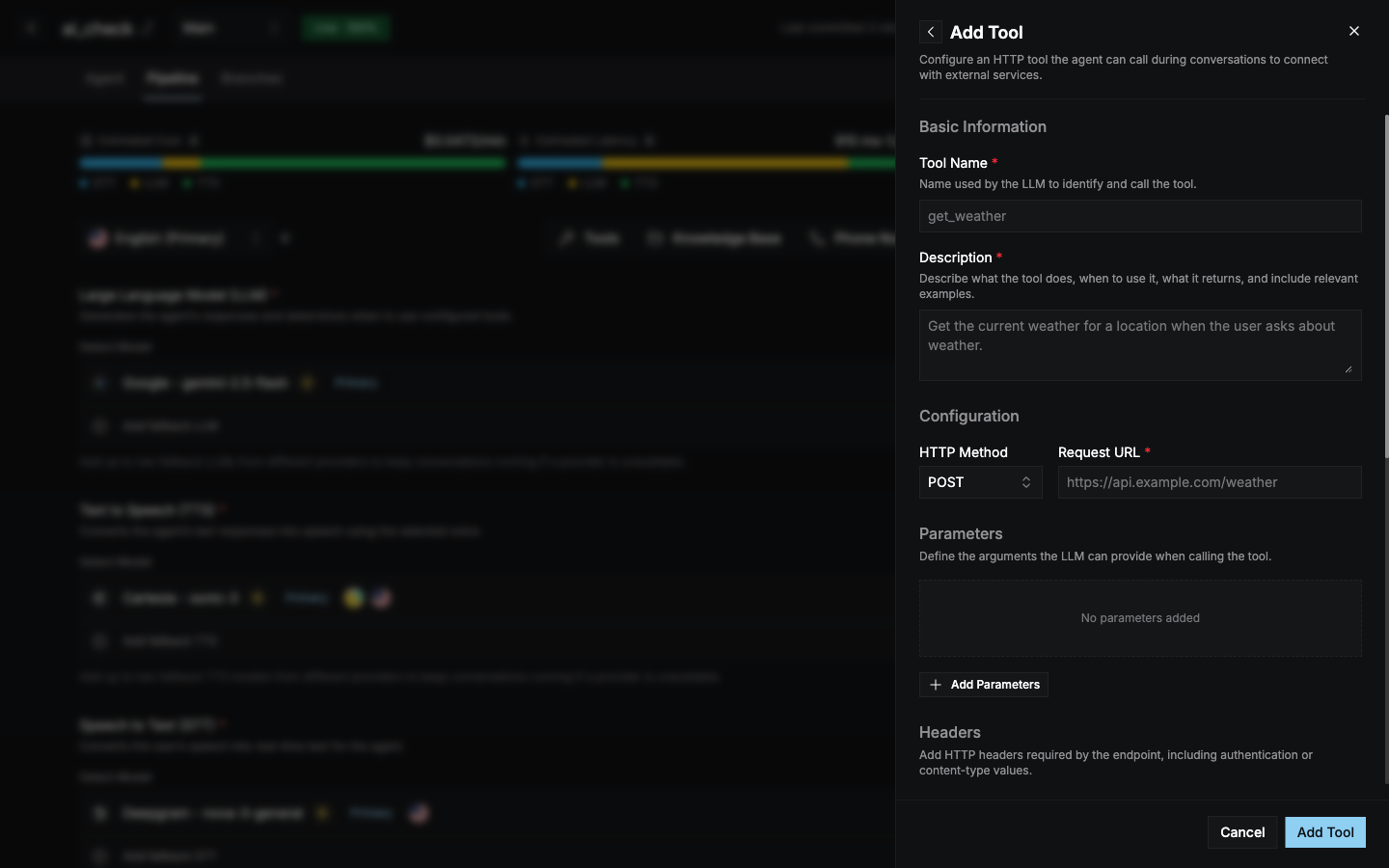 | Field | Description |
| - | - |
| **Tool Name** (required) | The name the LLM uses to call the tool, for example `get_weather`. Lowercase letters, digits, and underscores, starting with a letter. |
| **Description** (required) | What the tool does, when to use it, what it returns, and examples. The LLM relies on this to decide when to call the tool. |
| **HTTP Method** | `GET`, `POST` (default), `PUT`, `PATCH`, or `DELETE`. |
| **Request URL** (required) | The endpoint to call. It must start with `https://`. |
| **Parameters** | Arguments the LLM fills in when calling the tool. Each has a type (`String`, `Number`, or `Boolean`), a name, and a description. |
| **Headers** | HTTP headers the endpoint needs, such as authentication or content type. |
| **Before Tool Call Message** | What the agent says before calling the tool, for example *"Please hold on while I fetch that."* |
| **Tool Error Message** | What the agent says if the tool returns an error. |
| **Response Timeout** | How long to wait for a response (10–60 s, default 10 s). |
| **Timeout Message** | What the agent says if the request times out. |
```text Example description theme={null}
Get the current weather for a city when the user asks about weather.
Returns temperature in Celsius and a short condition, for example "22, sunny".
```
Mention the tool in your [system prompt](/agent-builder/agent/system-instructions-and-greeting) too, for example *"Use get\_order\_status whenever the caller asks where their order is."*
This documentation is built and hosted on [Mintlify](https://mintlify.com), a developer documentation platform.
| Field | Description |
| - | - |
| **Tool Name** (required) | The name the LLM uses to call the tool, for example `get_weather`. Lowercase letters, digits, and underscores, starting with a letter. |
| **Description** (required) | What the tool does, when to use it, what it returns, and examples. The LLM relies on this to decide when to call the tool. |
| **HTTP Method** | `GET`, `POST` (default), `PUT`, `PATCH`, or `DELETE`. |
| **Request URL** (required) | The endpoint to call. It must start with `https://`. |
| **Parameters** | Arguments the LLM fills in when calling the tool. Each has a type (`String`, `Number`, or `Boolean`), a name, and a description. |
| **Headers** | HTTP headers the endpoint needs, such as authentication or content type. |
| **Before Tool Call Message** | What the agent says before calling the tool, for example *"Please hold on while I fetch that."* |
| **Tool Error Message** | What the agent says if the tool returns an error. |
| **Response Timeout** | How long to wait for a response (10–60 s, default 10 s). |
| **Timeout Message** | What the agent says if the request times out. |
```text Example description theme={null}
Get the current weather for a city when the user asks about weather.
Returns temperature in Celsius and a short condition, for example "22, sunny".
```
Mention the tool in your [system prompt](/agent-builder/agent/system-instructions-and-greeting) too, for example *"Use get\_order\_status whenever the caller asks where their order is."*
This documentation is built and hosted on [Mintlify](https://mintlify.com), a developer documentation platform.