> ## Documentation Index
> Fetch the complete documentation index at: https://docs.zeroruntime.ai/llms.txt
> Use this file to discover all available pages before exploring further.
# PII Redaction
> Remove sensitive values from a session's recording and transcript before either is published.
## Overview
Name the kinds of value a session treats as sensitive, and Zero Runtime removes them before anything is published: the flagged turn's audio becomes a tone in the recording, and its text becomes a label in the transcript. Everything else publishes untouched.
Redaction is off unless a session asks for it.
* Applies to a **whole turn**, not to individual words.
* Covers the **audio recording** only, not video or screen share.
* Available from **Python SDK v0.1.7** and **Node JS SDK v0.1.2**.
## Configuration
`PIIRedaction` takes `rules` and an optional `target`.
```python title="Python" Python theme={null}
PIIRedaction(
target=[
RedactionTarget.RECORDING,
RedactionTarget.TRANSCRIPT,
],
rules={
PIIType.CREDIT_CARD: "CARD",
PIIType.PHONE_NUMBER: "NUMBER",
PIIType.EMAIL: "MAIL",
PIIType.IDENTITY_NUMBER: "ID",
PIIType.ADDRESS: "ADDRESS",
PIIType.NAME: "NAME",
PIIType.DATE_OF_BIRTH: "DOB",
PIIType.DIGIT_RUN: "ACCOUNT",
"Policy Number": "POLICY",
},
)
```
```typescript title="Node JS" Node JS theme={null}
PIIRedaction({
target: [
RedactionTarget.RECORDING,
RedactionTarget.TRANSCRIPT,
],
rules: {
[PIIType.CREDIT_CARD]: 'CARD',
[PIIType.PHONE_NUMBER]: 'NUMBER',
[PIIType.EMAIL]: 'MAIL',
[PIIType.IDENTITY_NUMBER]: 'ID',
[PIIType.ADDRESS]: 'ADDRESS',
[PIIType.NAME]: 'NAME',
[PIIType.DATE_OF_BIRTH]: 'DOB',
[PIIType.DIGIT_RUN]: 'ACCOUNT',
'Policy Number': 'POLICY',
},
});
```
### `target`
defines where redaction is applied.
| `target` | Recording | Transcript |
| - | - | - |
| Not set | Redacted | Redacted |
| `[RECORDING]` | Redacted | Original |
| `[TRANSCRIPT]` | Original | Redacted |
| `[]` / `None` | Original | Original |
> If recording is disabled, only the transcript is redacted.
`RECORDING` requires `recording=True` on the same `Room`.
### `rules`
defines what to redact and what to replace it with.
If a PII type is not included, it is not redacted.
* `IDENTITY_NUMBER` → Social Security, passport, Aadhaar
* `DIGIT_RUN` → Account and reference numbers
* Custom types are supported, for example `"Policy Number"`
## Validation
The session will not start if the redaction configuration is invalid.
* `rules` must contain at least one PII type.
* Each rule must map a PII type to a text label.
* `target` must be a list containing `RECORDING` or `TRANSCRIPT` or Both.
- An empty label (`""`) removes the sensitive content without adding a replacement label.
- In recordings, redacted turns are replaced with a tone. Redacted transcripts are published after the call ends.
## Code Example
Redaction is part of observability, so it travels on the `Room`.
```python title="Python" Python theme={null}
import zeroruntime
from zeroruntime import Observability, PIIRedaction, PIIType, RedactionTarget, Room
redaction = PIIRedaction(
target=[RedactionTarget.RECORDING, RedactionTarget.TRANSCRIPT],
rules={
PIIType.CREDIT_CARD: "CARD",
PIIType.PHONE_NUMBER: "NUMBER",
PIIType.EMAIL: "MAIL",
"Date Of Birth": "DOB",
},
)
room = Room(recording=True, observability=Observability(pii_redaction=redaction))
zeroruntime.serve(Assistant, room=room, on_ready=lambda: zeroruntime.invoke(AGENT_ID))
```
```typescript title="Node JS" Node JS theme={null}
import * as zeroruntime from '@zeroruntime/js-sdk';
import { Observability, PIIRedaction, PIIType, RedactionTarget, Room } from '@zeroruntime/js-sdk';
const redaction = PIIRedaction({
target: [RedactionTarget.RECORDING, RedactionTarget.TRANSCRIPT],
rules: {
[PIIType.CREDIT_CARD]: 'CARD',
[PIIType.PHONE_NUMBER]: 'NUMBER',
[PIIType.EMAIL]: 'MAIL',
'Date Of Birth': 'DOB',
},
});
const room = Room({ recording: true, observability: Observability({ pii_redaction: redaction }) });
zeroruntime.serve(Assistant, { room, on_ready: () => zeroruntime.invoke(AGENT_ID) });
```
## In the Dashboard
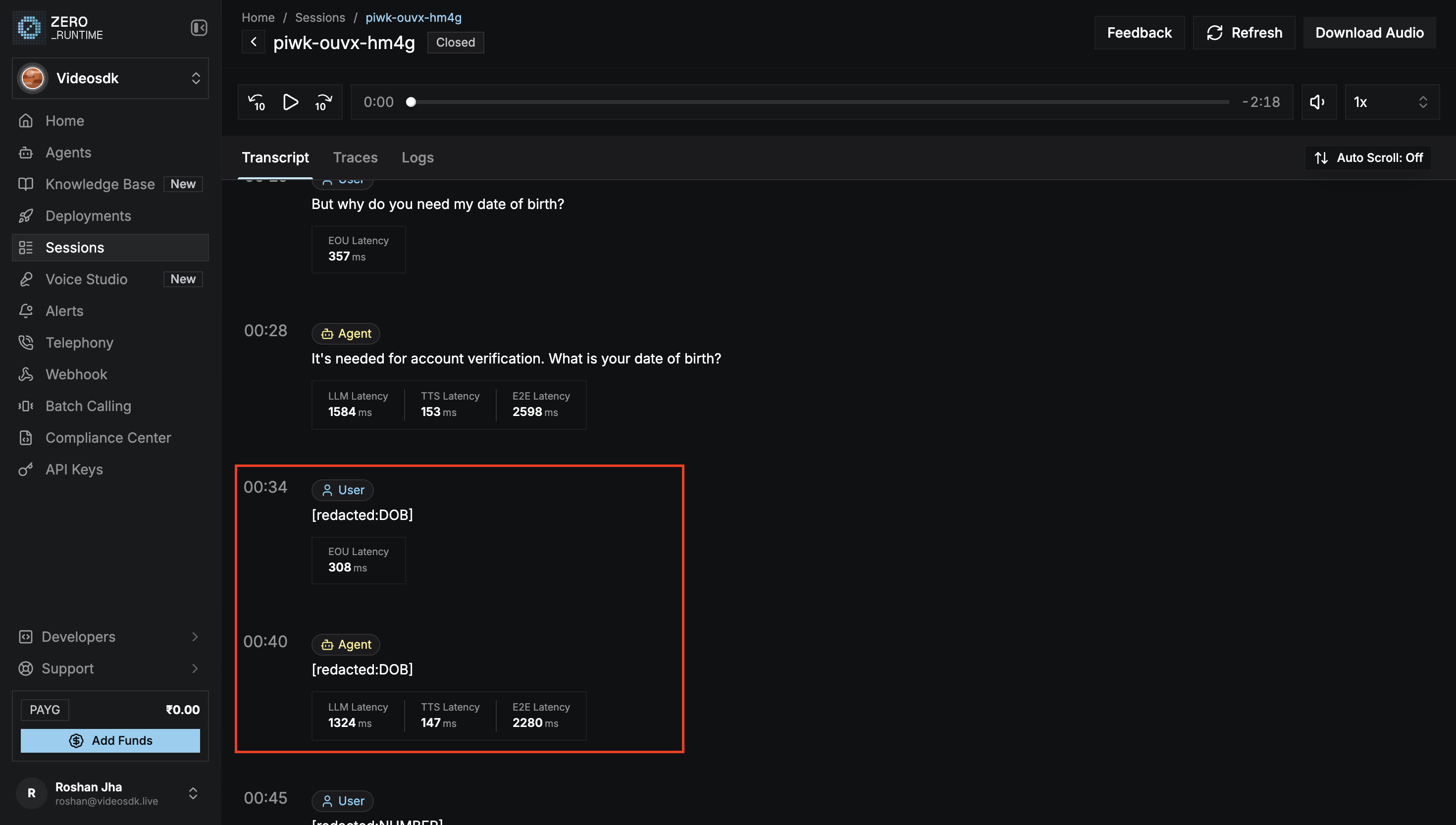
A flagged turn reads as its label, so the conversation around it stays readable.
 | Spoken | Published |
| - | - |
| "my card is 4111 1111 1111 1111" | `[redacted:CARD]` |
| A turn carrying two kinds | `[redacted:CARD,MAIL]` |
| Any flagged turn, in the recording | A tone |
## What's Next
Turn on the recording that redaction removes the flagged turns from.
Review a session's transcript on the Dashboard.
## References
#### Examples
Redact a session's recording and transcript.
#### Examples
Redact a session's recording and transcript.
| Spoken | Published |
| - | - |
| "my card is 4111 1111 1111 1111" | `[redacted:CARD]` |
| A turn carrying two kinds | `[redacted:CARD,MAIL]` |
| Any flagged turn, in the recording | A tone |
## What's Next
Turn on the recording that redaction removes the flagged turns from.
Review a session's transcript on the Dashboard.
## References
#### Examples
Redact a session's recording and transcript.
#### Examples
Redact a session's recording and transcript.