> ## Documentation Index
> Fetch the complete documentation index at: https://docs.zeroruntime.ai/llms.txt
> Use this file to discover all available pages before exploring further.
# Build Your First Voice AI Agent
> Ship a voice agent in minutes using a realtime speech-to-speech model or a cascading STT-LLM-TTS pipeline.
## Prerequisites
Before you begin, ensure you have:
* A ZRT Auth token **or** API key + secret from [app.zeroruntime.ai](https://app.zeroruntime.ai/api-keys) (see [Authentication](/authentication)).
* Python 3.11 or higher.
## Understanding the Architecture
Before diving into implementation, choose the pipeline architecture that fits your use case.
**Cascade** processes audio through distinct stages for maximum control:
 The cascade processes audio through sequential stages:
**User Voice Input** → **STT (Speech-to-Text)** → **LLM (Large Language Model)** → **TTS (Text-to-Speech)** → **Agent Voice Output**
This approach provides better control over each processing stage and supports more complex AI reasoning. Power each stage through the **Zero Runtime Inference gateway** (one token, no per-provider keys) or bring your own provider keys.
**Realtime** provides direct speech-to-speech processing with minimal latency:
The cascade processes audio through sequential stages:
**User Voice Input** → **STT (Speech-to-Text)** → **LLM (Large Language Model)** → **TTS (Text-to-Speech)** → **Agent Voice Output**
This approach provides better control over each processing stage and supports more complex AI reasoning. Power each stage through the **Zero Runtime Inference gateway** (one token, no per-provider keys) or bring your own provider keys.
**Realtime** provides direct speech-to-speech processing with minimal latency:
 The realtime pipeline processes audio directly through a unified model:
**User Voice Input** → **Speech-to-Speech model** → **Agent Voice Output**
This approach offers the fastest response times and is ideal for real-time conversations.
## Build the Agent
Pick your language. Each track builds the same agent on the **Cascade** pipeline (Deepgram STT → Google Gemini LLM → Cartesia TTS).
Use Python 3.11 or higher, then install the Zero Runtime Agents SDK. Create and activate a virtual environment, then install `zrt`. Every provider plugin ships with it.
```bash uv theme={null}
uv venv --python 3.11
source .venv/bin/activate # macOS/Linux
.\.venv\Scripts\activate # Windows
```
```bash pip theme={null}
python3.11 -m venv venv
source venv/bin/activate # macOS/Linux
.\venv\Scripts\activate # Windows
```
New to uv? See the [uv install guide](https://docs.astral.sh/uv/getting-started/installation/).
```bash uv theme={null}
uv pip install zrt
```
```bash pip theme={null}
pip install zrt
```
Prefer to bring your own provider keys? Every provider ships with `zrt`. Just import from `zrt.plugins.*`. See the plugin pages for [STT](/plugins/stt/openai), [LLM](/plugins/llm/openai), and [TTS](/plugins/tts/elevenlabs).
```bash uv theme={null}
uv pip install zrt
```
```bash pip theme={null}
pip install zrt
```
Store API keys and tokens in a `.env` file in your project root.
```shell title=".env" theme={null}
# The Inference gateway authenticates with your Zero Runtime token -
# no separate STT, LLM, or TTS provider keys needed.
# Option A: pre-generated token
ZRT_AUTH_TOKEN = "ZRT Auth token"
# Option B: SDK auto-generates token (omit ZRT_AUTH_TOKEN)
# ZRT_API_KEY = "Your Zero Runtime API Key"
# ZRT_SECRET_KEY = "Your Zero Runtime Secret Key"
```
```shell title=".env" theme={null}
# Option A: pre-generated token
ZRT_AUTH_TOKEN="ZRT Auth token"
# Option B: SDK auto-generates token (omit ZRT_AUTH_TOKEN)
# ZRT_API_KEY="Your Zero Runtime API Key"
# ZRT_SECRET_KEY="Your Zero Runtime Secret Key"
OPENAI_API_KEY="Your OpenAI API Key"
# For Google Live API
# GOOGLE_API_KEY="Google Live API Key"
# For AWS Nova API
# AWS_ACCESS_KEY_ID="AWS Key Id"
# AWS_SECRET_ACCESS_KEY="AWS Secret Key"
# AWS_DEFAULT_REGION="AWS Region"
```
Get keys from [OpenAI](https://platform.openai.com/api-keys), [Gemini](https://aistudio.google.com/app/apikey), or [AWS](https://docs.aws.amazon.com/IAM/latest/UserGuide/security-creds.html). For Zero Runtime, use an auth token from the [Zero Runtime Dashboard](https://app.zeroruntime.ai/api-keys) or an API key + secret. Follow the [guide](/authentication).
Build the pipeline first, then create the agent that uses it. The `Pipeline` auto-detects its mode from the components you pass it: provide STT, LLM, and TTS for Cascade, or a single realtime model for Realtime. Define it at module scope so the agent class can reference it directly. The agent inherits from the base `Agent` class, the same for both pipelines. Only the pipeline setup and imports differ. `instructions` defines the agent's personality, `on_enter()` runs when it joins the room, and `on_exit()` runs when it leaves.
```python title="main.py" theme={null}
import zrt
from zrt import Agent, Pipeline, Room
from zrt.plugins import SileroVAD, TurnDetector, CartesiaSTT, GoogleLLM, CartesiaTTS
from zrt.inference import AICousticsDenoise
AGENT_ID = "assistant"
# Create the pipeline first - STT, LLM, and TTS resolve through the Zero Runtime
# Inference gateway. Build it at module scope so the agent class can reference it.
pipeline = Pipeline(
stt=CartesiaSTT(model="ink-2"),
llm=GoogleLLM(model="gemini-2.5-flash"),
tts=CartesiaTTS(model="sonic-2"),
vad=SileroVAD(threshold=0.4),
turn_detector=TurnDetector(model="echo-large"),
denoise=AICousticsDenoise(model_id="quail-vf-2.2-l-16khz"),
)
class MyVoiceAgent(Agent):
def __init__(self):
super().__init__(
agent_id=AGENT_ID,
instructions="You are a helpful voice assistant that can answer questions and help with tasks.",
pipeline=pipeline,
)
async def on_enter(self):
await self.session.say("Hello! How can I help?")
async def on_exit(self):
await self.session.say("Goodbye!")
```
```python title="main.py" theme={null}
import zrt
from zrt import Agent, Pipeline, Room
from zrt.plugins import OpenAIRealtime, OpenAIRealtimeConfig
AGENT_ID = "assistant"
# Create the pipeline first - a single realtime model, built at module scope
# so the agent class can reference it.
model = OpenAIRealtime(
config=OpenAIRealtimeConfig(
model="gpt-4o-realtime-preview",
voice="alloy", # alloy, ash, ballad, breeze, cedar, cinnamon, coral, echo, ember, juniper, marin, sage, shimmer, verse
modalities=["text", "audio"],
# turn_detection defaults to server VAD (threshold 0.5); pass an
# OpenAIRealtimeConfig turn_detection to customize it.
),
)
pipeline = Pipeline(llm=model)
class MyVoiceAgent(Agent):
def __init__(self):
super().__init__(
agent_id=AGENT_ID,
instructions="You are a helpful voice assistant that can answer questions and help with tasks.",
pipeline=pipeline,
)
async def on_enter(self):
await self.session.say("Hello! How can I help?")
async def on_exit(self):
await self.session.say("Goodbye!")
```
With the pipeline and agent defined, hand the agent *class* to `zrt.serve(...)`. This wiring is the same for both pipelines.
```python title="main.py" theme={null}
def invoke_agent():
# room_id="YOUR_MEETING_ID" # Set to join a pre-created room; omit to auto-create
zrt.invoke(AGENT_ID, room=Room(playground=True))
if __name__ == "__main__":
# Pass the class itself (not an instance): serve() builds a fresh MyVoiceAgent +
# pipeline per call, which is required for correct per-call state under concurrent calls.
zrt.serve(MyVoiceAgent, on_ready=invoke_agent)
```
`serve()` registers the agent under its `agent_id` and blocks, starting a fresh session for each caller. Passing the `MyVoiceAgent` class itself (not a pre-built instance) lets `serve()` construct a fresh agent + pipeline per call, which is required for correct per-call state under concurrent calls. `on_ready=invoke_agent` fires `zrt.invoke(...)` once the agent is registered, which resolves a room and returns a playground URL to open the session.
With your `.env` configured and dependencies installed, run the project with Python.
Once you run this command, a playground URL appears in your terminal. Use this URL to interact with your AI agent.
```bash uv theme={null}
uv run python main.py
```
```bash pip theme={null}
python main.py
```
```bash uv theme={null}
uv run python main.py console
```
```bash pip theme={null}
python main.py console
```
Want to see the magic instantly? Console mode lets you interact with your agent directly through the terminal, no meeting room needed, just speak and listen through your local system. Perfect for quick testing and development.
The realtime pipeline processes audio directly through a unified model:
**User Voice Input** → **Speech-to-Speech model** → **Agent Voice Output**
This approach offers the fastest response times and is ideal for real-time conversations.
## Build the Agent
Pick your language. Each track builds the same agent on the **Cascade** pipeline (Deepgram STT → Google Gemini LLM → Cartesia TTS).
Use Python 3.11 or higher, then install the Zero Runtime Agents SDK. Create and activate a virtual environment, then install `zrt`. Every provider plugin ships with it.
```bash uv theme={null}
uv venv --python 3.11
source .venv/bin/activate # macOS/Linux
.\.venv\Scripts\activate # Windows
```
```bash pip theme={null}
python3.11 -m venv venv
source venv/bin/activate # macOS/Linux
.\venv\Scripts\activate # Windows
```
New to uv? See the [uv install guide](https://docs.astral.sh/uv/getting-started/installation/).
```bash uv theme={null}
uv pip install zrt
```
```bash pip theme={null}
pip install zrt
```
Prefer to bring your own provider keys? Every provider ships with `zrt`. Just import from `zrt.plugins.*`. See the plugin pages for [STT](/plugins/stt/openai), [LLM](/plugins/llm/openai), and [TTS](/plugins/tts/elevenlabs).
```bash uv theme={null}
uv pip install zrt
```
```bash pip theme={null}
pip install zrt
```
Store API keys and tokens in a `.env` file in your project root.
```shell title=".env" theme={null}
# The Inference gateway authenticates with your Zero Runtime token -
# no separate STT, LLM, or TTS provider keys needed.
# Option A: pre-generated token
ZRT_AUTH_TOKEN = "ZRT Auth token"
# Option B: SDK auto-generates token (omit ZRT_AUTH_TOKEN)
# ZRT_API_KEY = "Your Zero Runtime API Key"
# ZRT_SECRET_KEY = "Your Zero Runtime Secret Key"
```
```shell title=".env" theme={null}
# Option A: pre-generated token
ZRT_AUTH_TOKEN="ZRT Auth token"
# Option B: SDK auto-generates token (omit ZRT_AUTH_TOKEN)
# ZRT_API_KEY="Your Zero Runtime API Key"
# ZRT_SECRET_KEY="Your Zero Runtime Secret Key"
OPENAI_API_KEY="Your OpenAI API Key"
# For Google Live API
# GOOGLE_API_KEY="Google Live API Key"
# For AWS Nova API
# AWS_ACCESS_KEY_ID="AWS Key Id"
# AWS_SECRET_ACCESS_KEY="AWS Secret Key"
# AWS_DEFAULT_REGION="AWS Region"
```
Get keys from [OpenAI](https://platform.openai.com/api-keys), [Gemini](https://aistudio.google.com/app/apikey), or [AWS](https://docs.aws.amazon.com/IAM/latest/UserGuide/security-creds.html). For Zero Runtime, use an auth token from the [Zero Runtime Dashboard](https://app.zeroruntime.ai/api-keys) or an API key + secret. Follow the [guide](/authentication).
Build the pipeline first, then create the agent that uses it. The `Pipeline` auto-detects its mode from the components you pass it: provide STT, LLM, and TTS for Cascade, or a single realtime model for Realtime. Define it at module scope so the agent class can reference it directly. The agent inherits from the base `Agent` class, the same for both pipelines. Only the pipeline setup and imports differ. `instructions` defines the agent's personality, `on_enter()` runs when it joins the room, and `on_exit()` runs when it leaves.
```python title="main.py" theme={null}
import zrt
from zrt import Agent, Pipeline, Room
from zrt.plugins import SileroVAD, TurnDetector, CartesiaSTT, GoogleLLM, CartesiaTTS
from zrt.inference import AICousticsDenoise
AGENT_ID = "assistant"
# Create the pipeline first - STT, LLM, and TTS resolve through the Zero Runtime
# Inference gateway. Build it at module scope so the agent class can reference it.
pipeline = Pipeline(
stt=CartesiaSTT(model="ink-2"),
llm=GoogleLLM(model="gemini-2.5-flash"),
tts=CartesiaTTS(model="sonic-2"),
vad=SileroVAD(threshold=0.4),
turn_detector=TurnDetector(model="echo-large"),
denoise=AICousticsDenoise(model_id="quail-vf-2.2-l-16khz"),
)
class MyVoiceAgent(Agent):
def __init__(self):
super().__init__(
agent_id=AGENT_ID,
instructions="You are a helpful voice assistant that can answer questions and help with tasks.",
pipeline=pipeline,
)
async def on_enter(self):
await self.session.say("Hello! How can I help?")
async def on_exit(self):
await self.session.say("Goodbye!")
```
```python title="main.py" theme={null}
import zrt
from zrt import Agent, Pipeline, Room
from zrt.plugins import OpenAIRealtime, OpenAIRealtimeConfig
AGENT_ID = "assistant"
# Create the pipeline first - a single realtime model, built at module scope
# so the agent class can reference it.
model = OpenAIRealtime(
config=OpenAIRealtimeConfig(
model="gpt-4o-realtime-preview",
voice="alloy", # alloy, ash, ballad, breeze, cedar, cinnamon, coral, echo, ember, juniper, marin, sage, shimmer, verse
modalities=["text", "audio"],
# turn_detection defaults to server VAD (threshold 0.5); pass an
# OpenAIRealtimeConfig turn_detection to customize it.
),
)
pipeline = Pipeline(llm=model)
class MyVoiceAgent(Agent):
def __init__(self):
super().__init__(
agent_id=AGENT_ID,
instructions="You are a helpful voice assistant that can answer questions and help with tasks.",
pipeline=pipeline,
)
async def on_enter(self):
await self.session.say("Hello! How can I help?")
async def on_exit(self):
await self.session.say("Goodbye!")
```
With the pipeline and agent defined, hand the agent *class* to `zrt.serve(...)`. This wiring is the same for both pipelines.
```python title="main.py" theme={null}
def invoke_agent():
# room_id="YOUR_MEETING_ID" # Set to join a pre-created room; omit to auto-create
zrt.invoke(AGENT_ID, room=Room(playground=True))
if __name__ == "__main__":
# Pass the class itself (not an instance): serve() builds a fresh MyVoiceAgent +
# pipeline per call, which is required for correct per-call state under concurrent calls.
zrt.serve(MyVoiceAgent, on_ready=invoke_agent)
```
`serve()` registers the agent under its `agent_id` and blocks, starting a fresh session for each caller. Passing the `MyVoiceAgent` class itself (not a pre-built instance) lets `serve()` construct a fresh agent + pipeline per call, which is required for correct per-call state under concurrent calls. `on_ready=invoke_agent` fires `zrt.invoke(...)` once the agent is registered, which resolves a room and returns a playground URL to open the session.
With your `.env` configured and dependencies installed, run the project with Python.
Once you run this command, a playground URL appears in your terminal. Use this URL to interact with your AI agent.
```bash uv theme={null}
uv run python main.py
```
```bash pip theme={null}
python main.py
```
```bash uv theme={null}
uv run python main.py console
```
```bash pip theme={null}
python main.py console
```
Want to see the magic instantly? Console mode lets you interact with your agent directly through the terminal, no meeting room needed, just speak and listen through your local system. Perfect for quick testing and development.
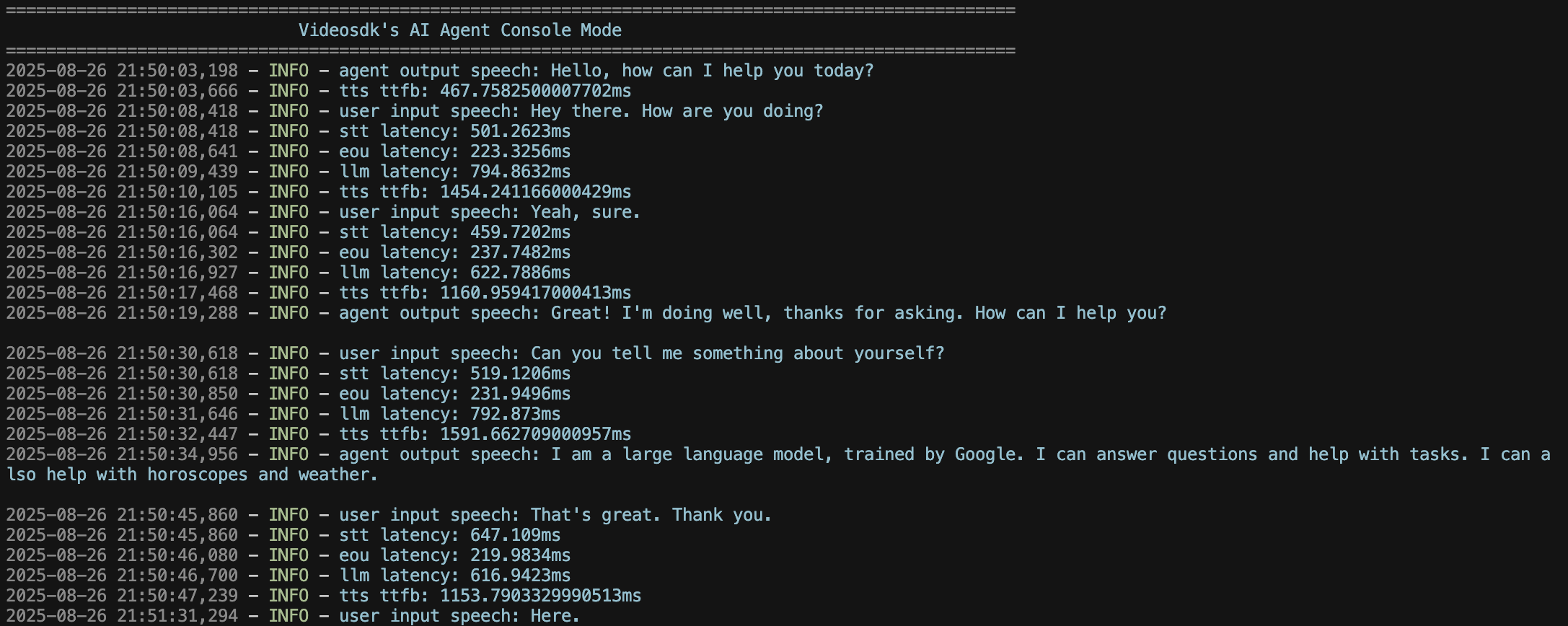 Learn more about [Console Mode](/build/configure-a-pipeline/console-mode).
## Verify
* The agent connects to the room and greets you.
* Audio flows both ways: the agent hears you and you hear it.
* In Cascade mode, the LLM's responses are spoken back through TTS; in Realtime mode, the model streams speech directly.
**Common errors:**
* **Missing auth token:** set `ZRT_AUTH_TOKEN` in your `.env`.
* **Plugin import error:** make sure `zrt` is installed in the active virtual environment (every provider ships with it).
* **No audio:** check microphone permissions, or confirm the client joined the same room.
Get started quickly with the [Quick Start Example](https://github.com/ZeroRuntimeAI/zrt-python-sdk-examples) for the Zero Runtime AI Agent SDK: everything you need to build your first AI agent fast.
## Troubleshooting
Common issues when setting up the project:
Make sure Python 3.11 is installed, then create the virtual environment with it.
```bash theme={null}
python3.11 -m venv venv
source venv/bin/activate # macOS/Linux
```
Newer Python versions (3.13+) removed the implicit event loop. Create your virtual environment with Python 3.11.
```bash theme={null}
python3.11 -m venv venv
source venv/bin/activate # macOS/Linux
```
You're running a Python outside the project's virtual environment. Activate it first, then install the dependencies.
```bash theme={null}
source venv/bin/activate # macOS/Linux
pip install zrt
python main.py
```
## What's Next
Let your agent call functions and act.
Understand the STT, LLM, and TTS flow.
## References
* [AI Agent (Complete Example)](https://github.com/ZeroRuntimeAI/zrt-python-sdk-examples/blob/main/features/basic_cascade.py)
* [Zero Runtime Inference Agent (Example)](https://github.com/ZeroRuntimeAI/zrt-python-sdk-examples/blob/main/features/inference_gateway.py)
Learn more about [Console Mode](/build/configure-a-pipeline/console-mode).
## Verify
* The agent connects to the room and greets you.
* Audio flows both ways: the agent hears you and you hear it.
* In Cascade mode, the LLM's responses are spoken back through TTS; in Realtime mode, the model streams speech directly.
**Common errors:**
* **Missing auth token:** set `ZRT_AUTH_TOKEN` in your `.env`.
* **Plugin import error:** make sure `zrt` is installed in the active virtual environment (every provider ships with it).
* **No audio:** check microphone permissions, or confirm the client joined the same room.
Get started quickly with the [Quick Start Example](https://github.com/ZeroRuntimeAI/zrt-python-sdk-examples) for the Zero Runtime AI Agent SDK: everything you need to build your first AI agent fast.
## Troubleshooting
Common issues when setting up the project:
Make sure Python 3.11 is installed, then create the virtual environment with it.
```bash theme={null}
python3.11 -m venv venv
source venv/bin/activate # macOS/Linux
```
Newer Python versions (3.13+) removed the implicit event loop. Create your virtual environment with Python 3.11.
```bash theme={null}
python3.11 -m venv venv
source venv/bin/activate # macOS/Linux
```
You're running a Python outside the project's virtual environment. Activate it first, then install the dependencies.
```bash theme={null}
source venv/bin/activate # macOS/Linux
pip install zrt
python main.py
```
## What's Next
Let your agent call functions and act.
Understand the STT, LLM, and TTS flow.
## References
* [AI Agent (Complete Example)](https://github.com/ZeroRuntimeAI/zrt-python-sdk-examples/blob/main/features/basic_cascade.py)
* [Zero Runtime Inference Agent (Example)](https://github.com/ZeroRuntimeAI/zrt-python-sdk-examples/blob/main/features/inference_gateway.py)