> ## Documentation Index
> Fetch the complete documentation index at: https://docs.zeroruntime.ai/llms.txt
> Use this file to discover all available pages before exploring further.
# Architecture
> What happens between a command arriving and the robot moving.
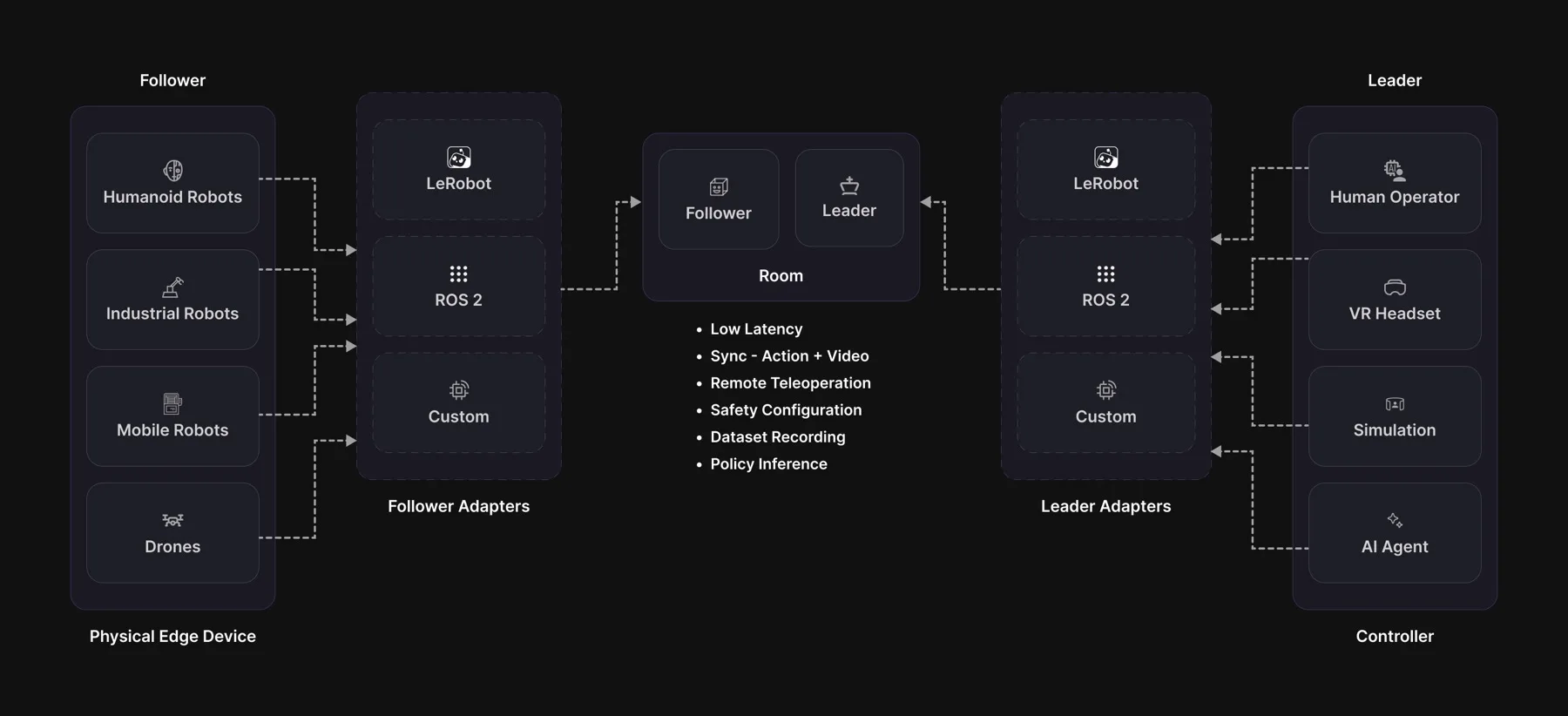 ## Key terms
### Room
The room both sides join, created through the API. Everything
in a session travels through it, and a third participant can join to record
without ever taking control.
### Session
One connected run: a follower and a leader in the same room. A room carries one
session at a time, and it ends when either side closes its transport.
### Follower
The machine that moves: a robotic arm, a humanoid, a mobile base or a drone,
real or simulated. It owns the cameras, the safety checks and the recording, and
nothing moves until it grants control.
### Leader
The machine that decides how to move: a person on a backdrivable arm, a VR
controller, a simulator or an AI model. It sends actions and never clamps them
itself, because limits belong to the follower.
### Descriptor
The joint schema the follower announces: names, order, units and control rate.
The leader compares it against its own when control is granted, and declines
if they differ.
### Observation
A snapshot of the robot at one moment: where every joint is, and a picture from
each camera. The follower keeps the two in sync for you and tags the pair with a
number.
### Action
Where the leader wants the joints to go next. The follower checks every action
against its limits before the motors see it, so the movement can end up smaller
than what was asked for.
### Tick
A **follower** tick checks that actions are still arriving, applies the newest
one through the limits, writes to the motors, and every few ticks sends an
observation. A **leader** tick reads the operator's pose and sends it, as long
as it holds the lease and the deadman, and keeps a heartbeat going either way.
Call `tick()` from your own scheduler, or let `run(hz)` pace it for you.
### Lease
Permission to command the follower. One holder at a time, granted and revoked by
the follower.
### Deadman
The hold-to-drive control on the leader. Actions flow only while it is held, and
letting go stops them, which leaves the follower holding position.
## How they fit together
For example, you are driving an arm toward a cube on a table.
1. Ten times a second the follower takes a snapshot: where the joints are, and
what the camera sees. Every snapshot gets a number, say `302`.
2. You see the cube on your screen and move your controller toward it. The
leader sends that position back along with `302`, so the follower knows
which snapshot you were reacting to.
3. The follower checks the position against its limits, moves the arm, and
records the snapshot and the movement together under `302`.
That number is the link. Without it, a recording would show pictures and
movements side by side with no way to tell which caused which.
## Related
The checks a command passes before it reaches the motors.
How video and joint readings are matched to the same moment.
What one tick does, gate by gate.
This documentation is built and hosted on [Mintlify](https://mintlify.com), a developer documentation platform.
## Key terms
### Room
The room both sides join, created through the API. Everything
in a session travels through it, and a third participant can join to record
without ever taking control.
### Session
One connected run: a follower and a leader in the same room. A room carries one
session at a time, and it ends when either side closes its transport.
### Follower
The machine that moves: a robotic arm, a humanoid, a mobile base or a drone,
real or simulated. It owns the cameras, the safety checks and the recording, and
nothing moves until it grants control.
### Leader
The machine that decides how to move: a person on a backdrivable arm, a VR
controller, a simulator or an AI model. It sends actions and never clamps them
itself, because limits belong to the follower.
### Descriptor
The joint schema the follower announces: names, order, units and control rate.
The leader compares it against its own when control is granted, and declines
if they differ.
### Observation
A snapshot of the robot at one moment: where every joint is, and a picture from
each camera. The follower keeps the two in sync for you and tags the pair with a
number.
### Action
Where the leader wants the joints to go next. The follower checks every action
against its limits before the motors see it, so the movement can end up smaller
than what was asked for.
### Tick
A **follower** tick checks that actions are still arriving, applies the newest
one through the limits, writes to the motors, and every few ticks sends an
observation. A **leader** tick reads the operator's pose and sends it, as long
as it holds the lease and the deadman, and keeps a heartbeat going either way.
Call `tick()` from your own scheduler, or let `run(hz)` pace it for you.
### Lease
Permission to command the follower. One holder at a time, granted and revoked by
the follower.
### Deadman
The hold-to-drive control on the leader. Actions flow only while it is held, and
letting go stops them, which leaves the follower holding position.
## How they fit together
For example, you are driving an arm toward a cube on a table.
1. Ten times a second the follower takes a snapshot: where the joints are, and
what the camera sees. Every snapshot gets a number, say `302`.
2. You see the cube on your screen and move your controller toward it. The
leader sends that position back along with `302`, so the follower knows
which snapshot you were reacting to.
3. The follower checks the position against its limits, moves the arm, and
records the snapshot and the movement together under `302`.
That number is the link. Without it, a recording would show pictures and
movements side by side with no way to tell which caused which.
## Related
The checks a command passes before it reaches the motors.
How video and joint readings are matched to the same moment.
What one tick does, gate by gate.
This documentation is built and hosted on [Mintlify](https://mintlify.com), a developer documentation platform.