> ## Documentation Index
> Fetch the complete documentation index at: https://docs.zeroruntime.ai/llms.txt
> Use this file to discover all available pages before exploring further.
# Safety
> The checks a command passes before it reaches the motors, and what none of them catch.
The follower moves real hardware, and it will do whatever a command tells it to.
Several checks stand between a bad command and the motors, and they are the
difference between a robot that stops when something goes wrong and one that
keeps going.
You set them with
[`SafetyConfig`](/robotics/api-reference/python/safety-config), which goes on
the follower rather than the leader. Only the follower can enforce a limit, so
one configured anywhere else is a suggestion.
## Safe states
The follower is always in one of five states, and only one of them moves the
robot.
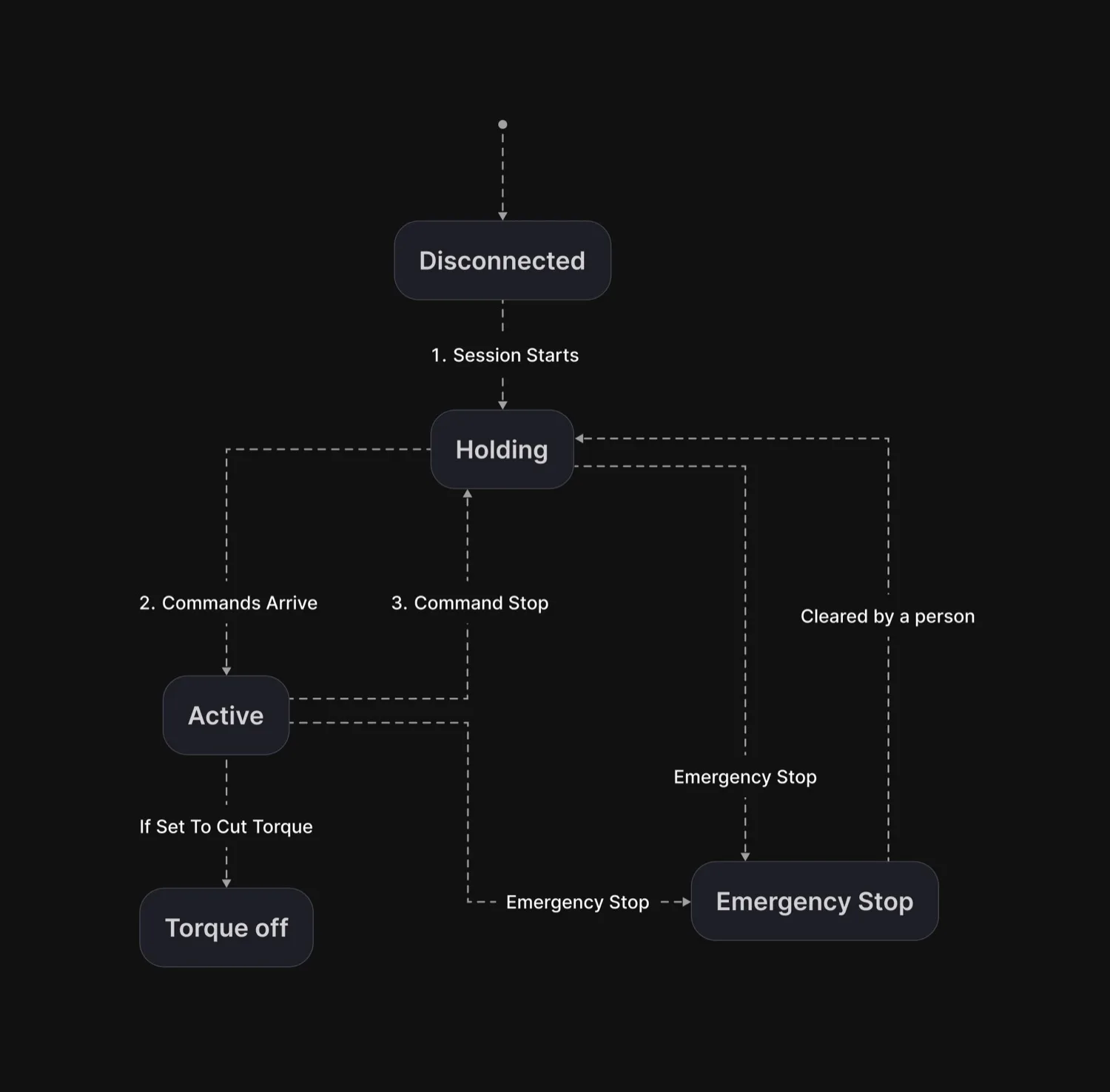 Steps 1 to 3 are the normal cycle. The other arrows can happen at any time.
| State | What the robot does | When |
| - | - | - |
| `DISCONNECTED` | nothing, no session yet | before `start()` |
| `HOLDING` | stays where it is, motors holding | no commands are being applied |
| `ACTIVE` | follows the leader | commands are arriving and allowed |
| `ESTOPPED` | stays where it is, and will not restart on its own | after an emergency stop |
| `TORQUE_OFF` | motors lose power, so a loaded arm falls | a failsafe was set to cut torque. `arm()` puts the power back and returns to `HOLDING` |
A normal session moves between `HOLDING` and `ACTIVE` all the time. Letting go
of the deadman, a network blip, or a slow tick all drop it back to `HOLDING`,
and the next command that arrives picks it up again.
Three things worth knowing:
* **`HOLDING` is the default failsafe, not `TORQUE_OFF`.** Cutting torque on a
loaded arm drops it, so the arm holds instead.
* **`ESTOPPED` never clears itself.** Only `clear_estop()` leaves it, which is
what makes it an emergency stop.
* **`TORQUE_OFF` is recoverable.** `arm()` reads where the arm has come to rest,
puts the power back and returns to `HOLDING`. Because it reads first, the arm
holds where it actually is rather than travelling back to the old target
through whatever arc it fell through.
## Before you run it
**Especially on real hardware, near people.**
* Anyone in the room can take control. Keep it private.
* Position limits exist only if `limits()` returns them.
* `slew` is per tick, so changing the tick rate changes the speed cap.
* Watch `stats()` for overruns. A loop that cannot hold its period makes the
watchdog meaningless.
* Tune the timeouts on your own link. The defaults have not seen your
network.
## Related
The gates, the emergency stop, and recovering from a failsafe.
Claiming control, the deadman, and arming.
Every safety setting and its default.
What a clamp leaves in the dataset.
This documentation is built and hosted on [Mintlify](https://mintlify.com), a developer documentation platform.
Steps 1 to 3 are the normal cycle. The other arrows can happen at any time.
| State | What the robot does | When |
| - | - | - |
| `DISCONNECTED` | nothing, no session yet | before `start()` |
| `HOLDING` | stays where it is, motors holding | no commands are being applied |
| `ACTIVE` | follows the leader | commands are arriving and allowed |
| `ESTOPPED` | stays where it is, and will not restart on its own | after an emergency stop |
| `TORQUE_OFF` | motors lose power, so a loaded arm falls | a failsafe was set to cut torque. `arm()` puts the power back and returns to `HOLDING` |
A normal session moves between `HOLDING` and `ACTIVE` all the time. Letting go
of the deadman, a network blip, or a slow tick all drop it back to `HOLDING`,
and the next command that arrives picks it up again.
Three things worth knowing:
* **`HOLDING` is the default failsafe, not `TORQUE_OFF`.** Cutting torque on a
loaded arm drops it, so the arm holds instead.
* **`ESTOPPED` never clears itself.** Only `clear_estop()` leaves it, which is
what makes it an emergency stop.
* **`TORQUE_OFF` is recoverable.** `arm()` reads where the arm has come to rest,
puts the power back and returns to `HOLDING`. Because it reads first, the arm
holds where it actually is rather than travelling back to the old target
through whatever arc it fell through.
## Before you run it
**Especially on real hardware, near people.**
* Anyone in the room can take control. Keep it private.
* Position limits exist only if `limits()` returns them.
* `slew` is per tick, so changing the tick rate changes the speed cap.
* Watch `stats()` for overruns. A loop that cannot hold its period makes the
watchdog meaningless.
* Tune the timeouts on your own link. The defaults have not seen your
network.
## Related
The gates, the emergency stop, and recovering from a failsafe.
Claiming control, the deadman, and arming.
Every safety setting and its default.
What a clamp leaves in the dataset.
This documentation is built and hosted on [Mintlify](https://mintlify.com), a developer documentation platform.