

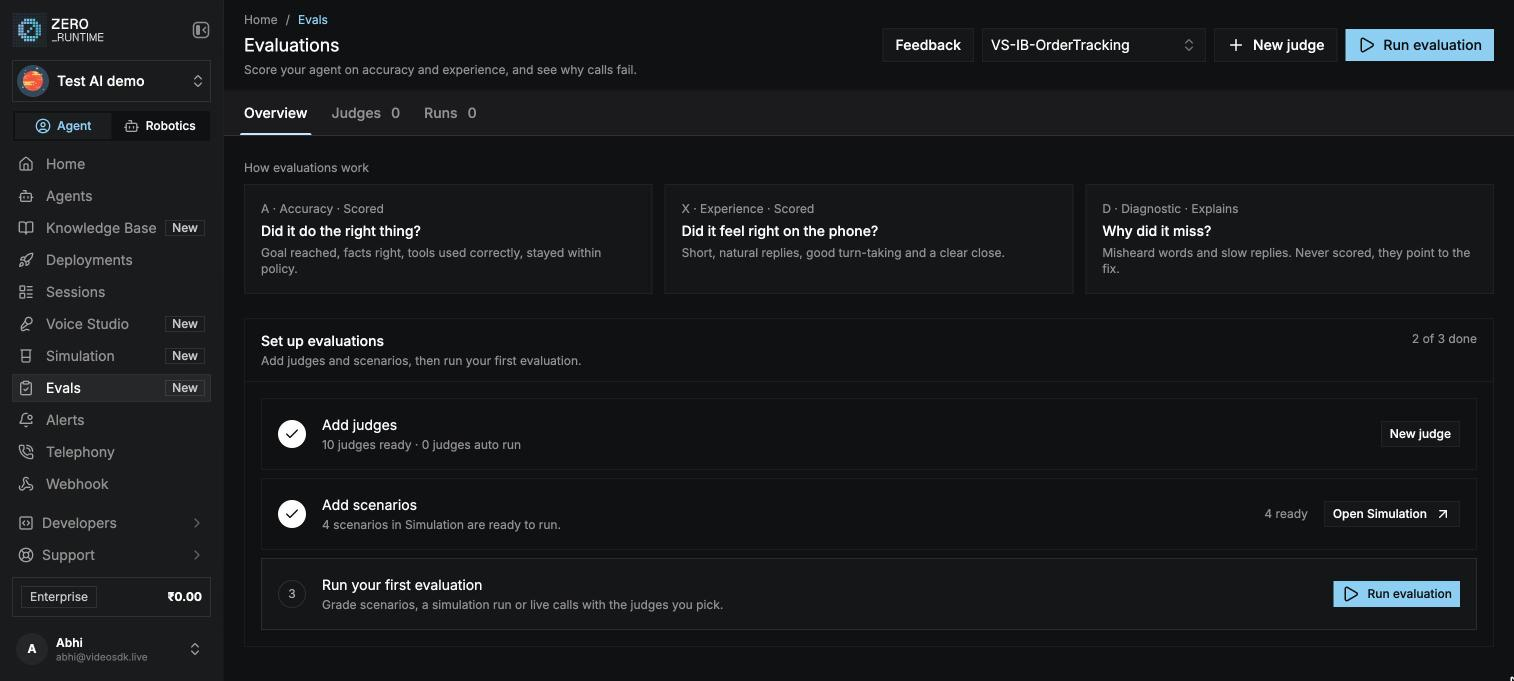
Core concepts
Judge categories
Every judge has a category. The category decides whether the judge counts toward the score.Verdicts
Each try also gets an overall status:
How a run is scored
A try passes a category when every judge in that category passes. A run’s Accuracy is the share of scenarios whose tries passed every accuracy judge, and Experience is the same for experience judges. When you grade live calls, each call counts as its own scenario. When each scenario is played more than once, use the toggle above the scores to choose how a scenario passes:
Separately, the scorecard gives every graded call a score and a band. The run shows the average score, the median, and how many calls landed in each band. See Scorecards.
Before you start
- Create an agent. Evaluations need at least one agent on your account.
- Have something to grade: scenarios in Simulation, a finished simulation run, or live calls to the agent.
- Have enough credits. AI and audio judges are billed as model usage for each call they read.
Set up evaluations
Until your first run finishes, the Overview tab shows a short checklist:1
Add judges
Use the default judges, or write your own for what a good call looks like. See Judges.
2
Add scenarios
Scenarios come from Simulation. Write a few callers your agent must handle. See Scenarios. You can skip this step if you only want to grade a past simulation run or live calls.
3
Run your first evaluation
Select Run evaluation, pick what to grade and the judges, and start the run. See Run an evaluation.
Judges
Write the questions every call is graded on.
Scorecards
Weigh judges and set score bands.
Run an evaluation
Grade scenarios, a simulation run, or live calls.
Review results
See which judge failed, on which call, and why.