

Manage scorecards
You pick a scorecard wherever one is used: in Run evaluation, in the agent’s auto run settings, and in Re-score. Open the scorecard dropdown and select New scorecard to create one. It’s picked as soon as you save it. Select Manage scorecards next to the dropdown to see every scorecard, and to edit, duplicate, or delete one.Create a scorecard
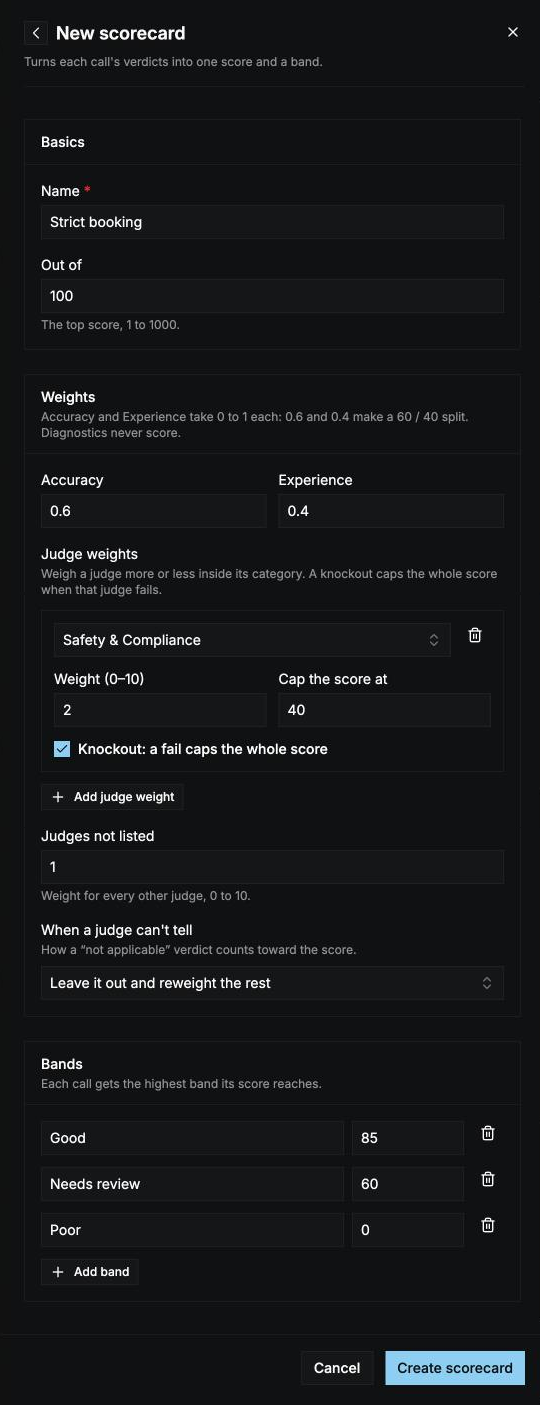
Basics
Weights
Diagnostic judges never count toward the score.
Bands
Each call gets the highest band its score reaches. Give each band a label and a minimum score. One band must start at 0, so every call gets a band. Add up to 10 bands. New scorecards start with three bands:
Select Create scorecard to save it.
How a call’s score is worked out
- Each judge gives a score: 1 for a pass, 0 for a fail. A can’t tell counts as set in When a judge can’t tell.
- Each category’s score is the weighted average of its judges’ scores.
- The call’s score is the average of the Accuracy and Experience scores, weighted by their category weights, times Out of. A category with no graded judges is left out.
- If a knockout judge failed, the score is capped at its cap. With more than one, the lowest cap applies.
(0.6 × 1 + 0.4 × 0.5) × 100 = 80.
Edit and delete
Editing a scorecard applies to new runs. Every run keeps a copy of the scorecard it was scored with, so past scores don’t change. To score a past run with your changes, re-score it. Deleting a scorecard that an agent’s auto run uses moves that agent to Default.In the CLI, scorecards can also use a custom formula, and judges can grade on a scale or a curve. See Evaluations in the CLI. A scorecard with a formula keeps it when you edit it in the dashboard.